
The Short Answer
Chaturbate gives you two ways out: Disable Account works while you're logged in and can be undone by support for up to 120 days. The permanent deletion tool can't be undone, and the privacy policy says any tokens, purchases and content left on the account are forfeited.
If you searched "how to delete Chaturbate account", start here: Chaturbate has two different exits, and only one of them lets you take your money out.
On 21 November 2026 we read Chaturbate's help center, the terms (updated 14 January 2026) and the privacy policy (dated 8 November 2023). We didn't close an account ourselves, and both account pages need a login, so the steps follow Chaturbate's own wording.
Disable Account or Permanent Deletion: The Two Exits
The help center describes a "Disable Account" link at the bottom of the Chaturbate home page and says you must be logged in to see it. The terms call the same route the "cancellation page", and add that customer support can close an account too.
Separately, the privacy policy points to a "deletion tool" for permanent deletion of your account and personal data, and the two routes treat your money very differently. Neither one runs through an app, since Chaturbate has no official app.
Disable Account vs the Deletion Tool
| Disable Account | Permanent deletion tool | |
|---|---|---|
| Where it lives | Footer link, used while logged in | Linked from the privacy policy |
| Can you undo it? | Yes, through support, for up to 120 days | No, it's permanent |
| Viewer money on deposit | Can be withdrawn, less third-party costs | Forfeited, with no refund |
| Broadcaster tokens left over | Paid on the next payout date | Forfeited under the same clause |
| Your username | Not addressed | Kept to stop impersonation |
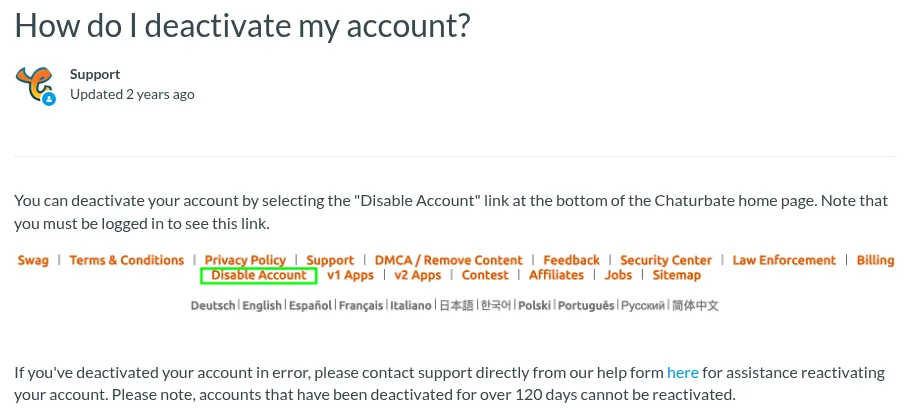
The Disable Account column follows the deactivation help page and the terms' termination clause. The deletion column follows the privacy policy's "Information Deletion" section.
Close Your Chaturbate Account in This Order
Order matters here, because memberships keep billing until they're cancelled and the deletion tool forfeits whatever is left. This sequence is pieced together from Chaturbate's help pages, terms and privacy policy.
Five Steps Before You Leave
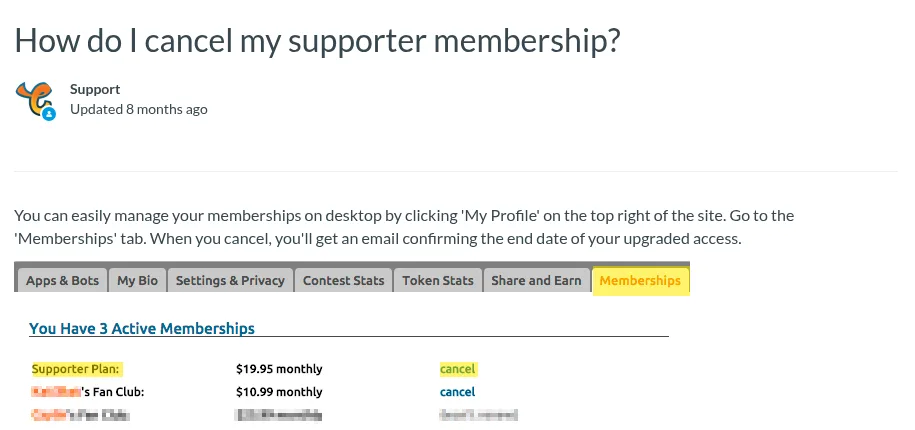
- Cancel the Supporter plan: On desktop, open My Profile, go to the Memberships tab and click cancel. Chaturbate then emails the date your upgraded access ends.
- Cancel fan clubs on the same tab: Card memberships bill monthly, while token-paid ones are billed three months at a time, up front, per the fan club help page.
- Deal with your money: Viewers can ask support about money still on deposit. Broadcasters should convert tokens in Token Stats before the pay period ends, as the conversion page advises.
- Use what you've paid for first: Once an account is closed, the terms say you lose access to the site's non-public areas and to any Member Content in your account, which is licensed for viewing on Chaturbate rather than for download unless the creator allows it.
- Pick one exit: Disable Account, in the site footer, stays reversible for 120 days if you ask support. If you want your personal data erased instead, use the deletion tool, which forfeits anything left, though Chaturbate doesn't say whether it still works on an account you've already disabled.
What Happens to Your Tokens and Earnings
This is where the two exits split. The terms and the privacy policy say different things because they describe different actions.
Where Each Kind of Balance Ends Up
- Tips you already sent: gone on either route, since tips are final once they're sent.
- Viewer deposits, closing through Disable Account: the terms say such amounts "can be withdrawn by you subject to any third-party costs".
- Broadcaster tokens, closing through Disable Account: remaining tokens "will be disbursed to the payment information on file" on the next payout date. Studio broadcasters can't convert, because their balance goes to the studio every night.
- Anything left when you use the deletion tool: the privacy policy says tokens, purchases, subscriptions and content are "forfeited by you to us", with no transfer or refund.

Not sure what a leftover balance is worth? Our breakdown of how Chaturbate tokens work converts it to dollars.
Changed Your Mind? The 120-Day Window
A disabled account isn't gone straight away. The help center says to contact support through its help form if you deactivated by mistake.
There's a limit, though: "accounts that have been deactivated for over 120 days cannot be reactivated." The deletion tool offers no such window, since the privacy policy describes it as "permanent deletion".
What Closing or Deleting Does to Your Data
Closing an account cuts off the members-only parts of the site and any Member Content you hold, including anything you bought. Deletion goes further, but it doesn't erase everything.
What Chaturbate Keeps After Deletion
- Your username: retained "to avoid anyone impersonating you," per the privacy policy.
- Fraud-prevention data: IP, device and access data shared with anti-fraud services "will be retained indefinitely."
- Broadcaster age-verification records: held for seven years from the last time content was available on the account, under federal record-keeping rules.
- Restricted accounts: if your account is under any restriction when you ask for deletion (a suspension, a ban or a limit on accounts, for example), the policy says it may be turned into a permanent ban, and minimal records are kept for as long as the restriction lasts.

Copies other people made of your broadcasts sit outside this process entirely. For wider privacy habits, our guide to staying anonymous on adult sites covers aliases and payment privacy.
Chaturbate Account Deletion FAQ
The everyday route is Disable Account, a footer link you use while signed in on the website. Permanent deletion uses a separate tool linked from the privacy policy, and that page asks for a login too.
Customer support can also close an account, which the terms allow.
It depends on the route. If you close through Disable Account, the terms let viewers withdraw money on deposit minus third-party costs, and broadcasters' remaining tokens go out on the next payout date.
Use the permanent deletion tool instead and, per the privacy policy, whatever tokens and purchases remain are lost for good.
Yes, for a while: support can reactivate it if you ask through the help form, but an account deactivated for more than 120 days can't be brought back.
A permanent deletion has no reactivation option at all, so skip that tool if there's any chance you'll return.
No: the help center is clear that Chaturbate has no official app, and it points people to a browser shortcut instead.
Removing a shortcut or an unofficial app closes nothing, because you can only close an account yourself through Disable Account, the deletion tool or customer support.
Not everything: under its privacy policy, Chaturbate keeps your username to stop impersonation and holds fraud-prevention data indefinitely. Broadcasters' age-verification records stay for seven years after their content was last available, under federal rules, and recordings others captured of your shows aren't covered at all.
It's the safer order. The terms say the cancellation page can end memberships too, but the help pages don't confirm that Disable Account stops Supporter or fan club billing on its own.
The cancel links sit under My Profile, in the Memberships tab, and a confirmation email gives the end date.
FetishAura's Bottom Line on Deleting Chaturbate
Closing a Chaturbate account goes best in sequence.
Cancel memberships, withdraw or convert what's left, then pick your exit: Disable Account if you might come back, or the deletion tool if you want your data erased and accept that Chaturbate's own policy forfeits anything still on the account.
If you're switching sites rather than quitting, our list of Chaturbate alternatives is a good next stop, and our Chaturbate review covers the platform in full.